Notes, meetings, and whatever tab you're on — in one panel that runs on your machine. Bring any model or agent and swap between them mid-conversation, while sensitive details are anonymized before they leave your browser and restored in the reply you read. No ChatPanel server in the middle.
Chat the moment you install — a private AI model runs right in your browser, no
API key, no account, nothing to set up.
Works in Firefox, Chrome, Edge, Brave & Arc. Move to a local model, a cloud API, or your own agent anytime.
The desktop app carries the Gateway and Bridge, so there is nothing else to install.
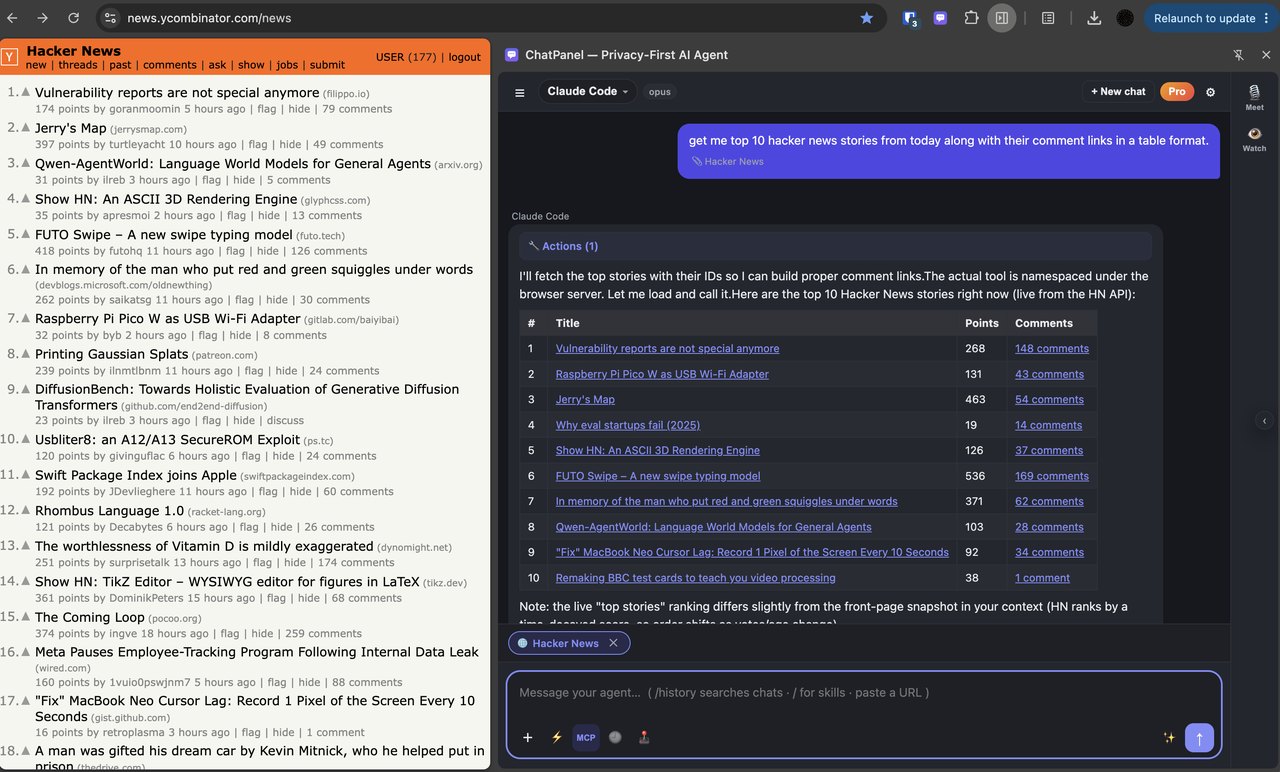
A side panel isn't the point — every browser ships one now. The point is that this one is yours: your model or agent, your notes and meetings as context, your sensitive data anonymized before it ever leaves the browser.
Six things a built-in browser assistant won't do for you.
No ChatPanel server sits in the path. Emails, phones, cards and keys — and with on-device AI, names, orgs and locations — are anonymized on your machine before a request goes out, then de-anonymized in the reply. The same protection can wrap the agents you already use.
Linked, wiki-style notes your AI can research, co-write and restructure alongside you — capture from any page, then turn a selection into a plan without leaving the panel.
Zoom, Meet, Teams and Webex — running notes, decisions and action items straight from the live captions. It all happens in your browser: no bot joins your call, nothing is uploaded.
The in-browser model, Ollama or LM Studio on your laptop, 20+ cloud APIs, or agents like Claude Code, Codex, GitHub Copilot and Antigravity under your own logins — switch between them mid-conversation.
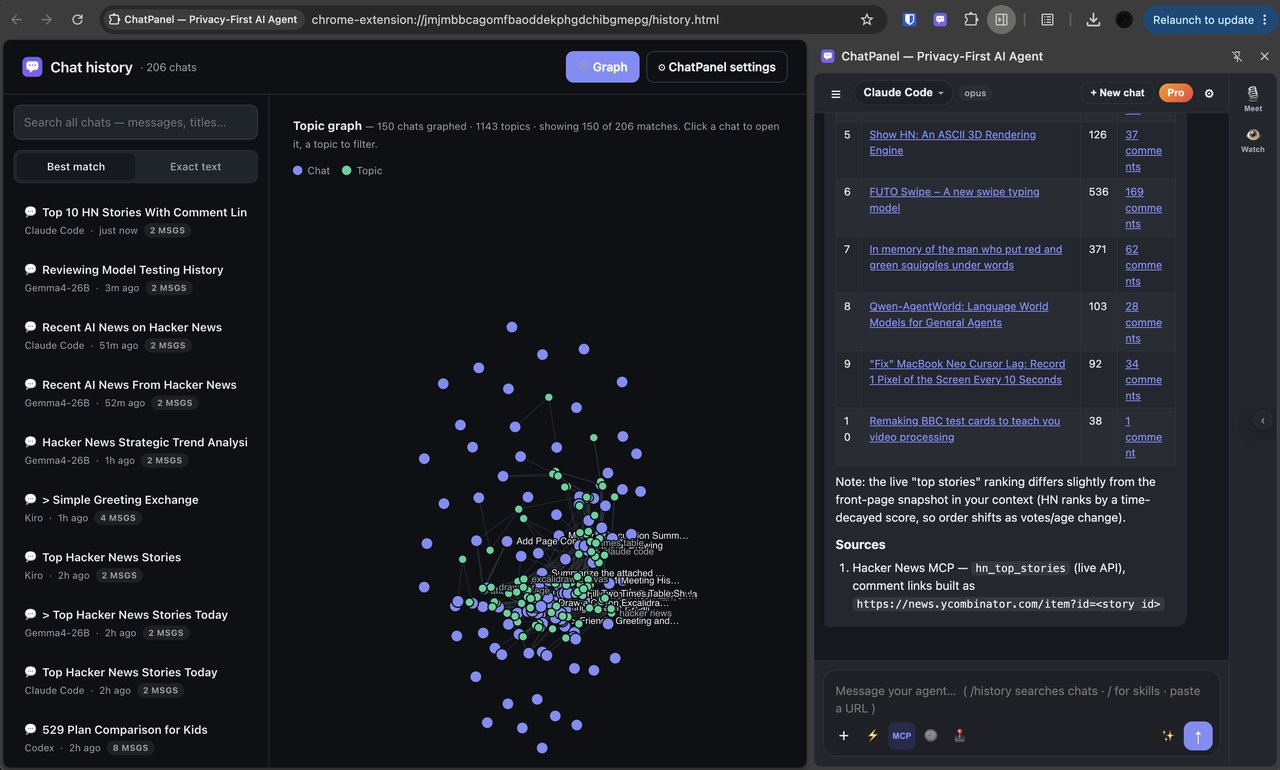
Notes, meetings and past chats live in a single searchable store, so an answer can draw on last week's call, a note from March, and the page in front of you at once.
MCP servers and browser actions give your AI real reach — and when you point it at a coding agent, its own tools come with it, so you get the full power of what you already pay for.
ChatPanel strips PII out of everything you send — emails, phones, cards and keys, plus (with on-device AI) names, organizations and locations — and puts it back in the reply you read. The model only ever sees opaque placeholders; your real values are restored for you.
Reversible anonymization swaps a value for a placeholder the model can still reason about, then restores it for you. Pseudonymize permanently swaps a name for an alias. Detection runs locally, you choose which categories to protect — and the same protection extends to the agents you already use, so Claude Code, Codex or any OpenAI-compatible client can sit behind it too.
I'm John from San Jose — call 932-043-4444
I'm [[PERSON_1]] from [[LOCATION_1]] — call [[PHONE_1]]Start on the in-browser model, move to Ollama on your laptop, jump to a cloud API, then hand the same conversation to Claude Code, Codex, GitHub Copilot or Antigravity running under your own logins. Switch mid-conversation — your panel, history and tools don't change.
A one-time helper app connects the local agents. Prefer a cloud or local model instead? Skip the helper and point ChatPanel straight at it.
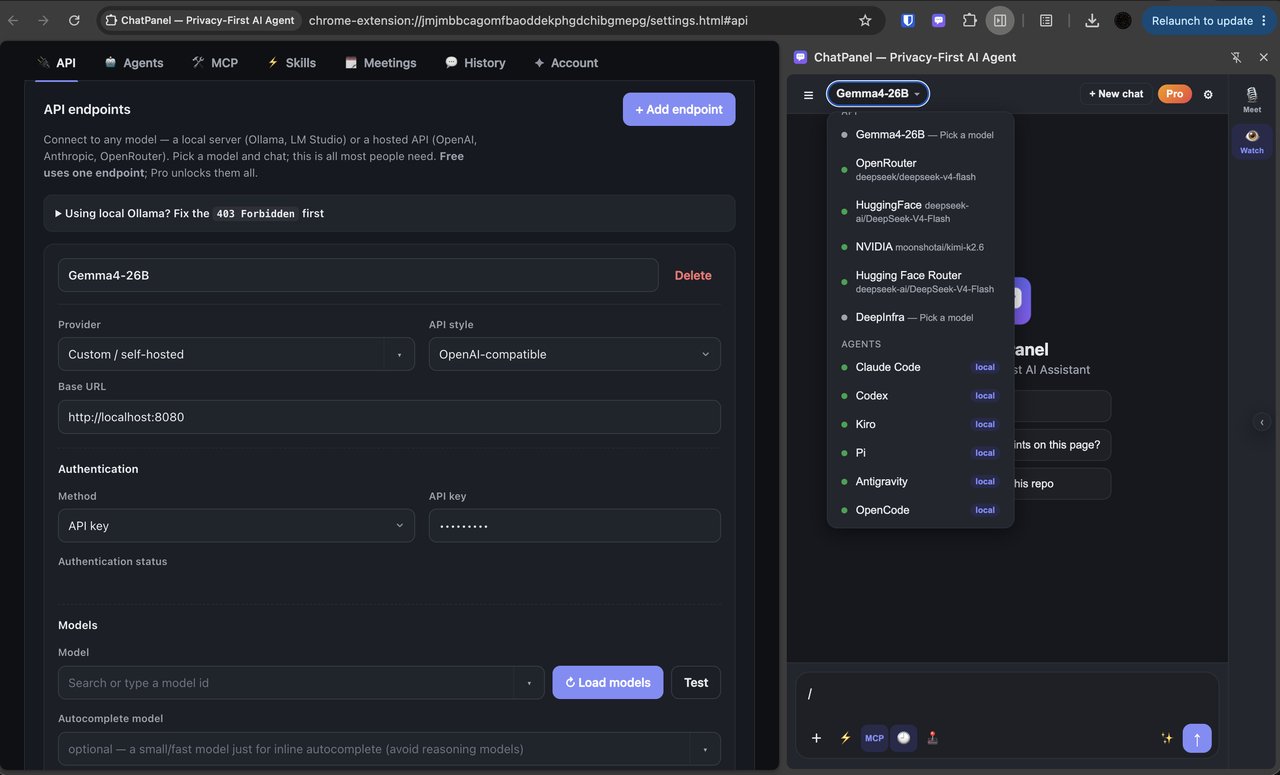
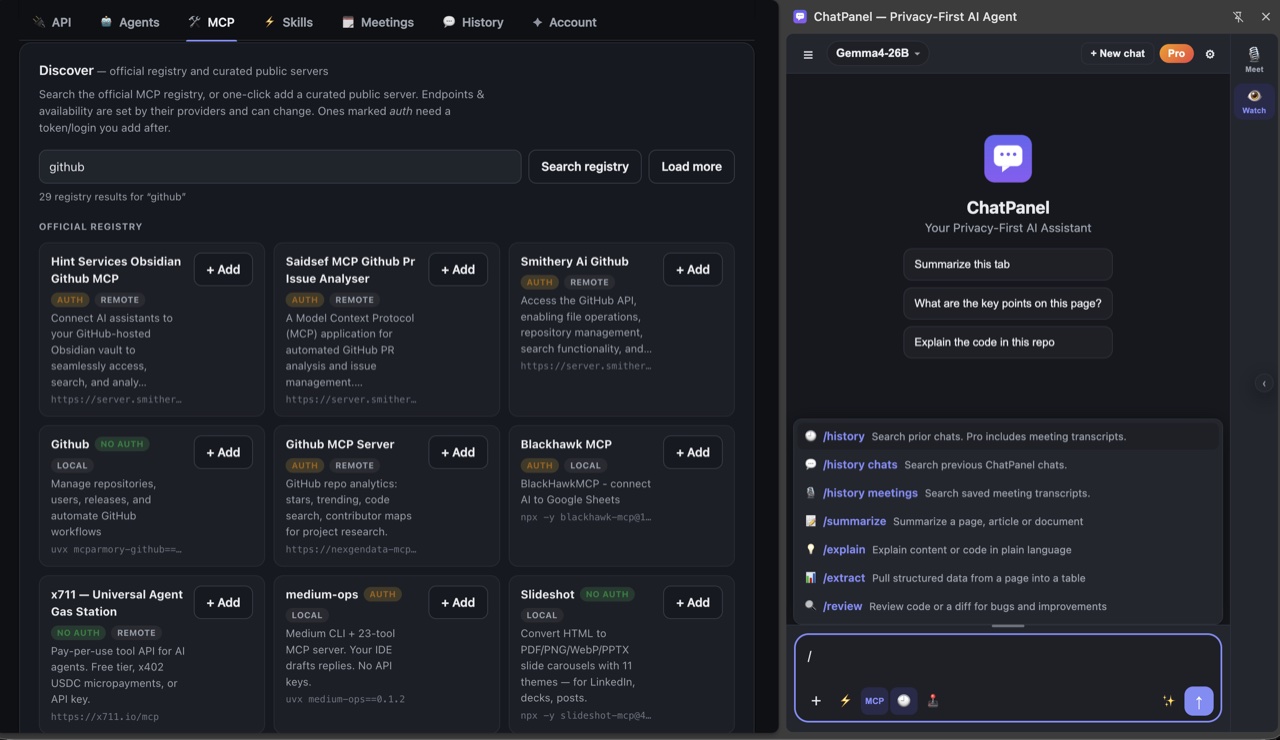
On its own, a chat model can only talk. Add MCP tools from a built-in directory and it can search, pull in live data, and work with your other apps on your behalf. Point the panel at a coding agent and its own tools come along too, so you get the full power of the agent you already pay for — right inside the chat.
Start with one tool for free; add as many as you like with Pro. Advanced users can even share their own browser back to other agents.
Everything you capture lands in a single searchable store on your computer: past conversations, linked notes, and meeting transcripts. Ask a question and the answer can draw on last week's call and the page you're on. Open a visual map of it all, grouped by topic, and jump straight back in.
On Zoom, Meet, Teams, and Webex, ChatPanel turns the live captions into running notes, decisions, and action items — plus a transcript you can search or ask about afterward. It runs entirely in your browser: no bot joins the call, and nothing is uploaded.
Reads the meeting's captions only — never your audio or video. Free covers your first 10 meetings; Pro is unlimited.
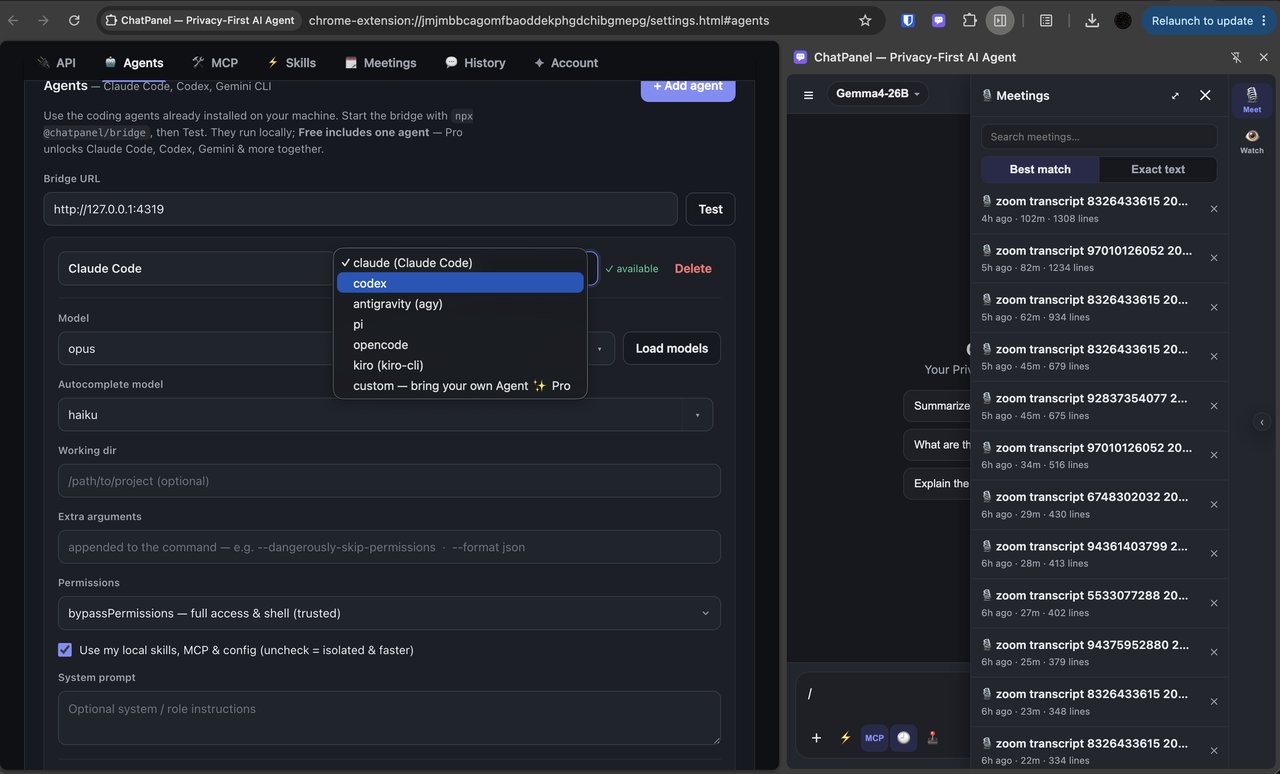
Save the things you ask for again and again — summarize, explain, review — as one-tap shortcuts. Use the built-ins, or write your own and drop them into any chat.
Smaller touches that add up. Most take a quick one-time setup.
Pull in the current tab, other tabs you pick, highlighted text, or a link you paste — and only when you ask for it.
Turn on Act on Page and ask in plain words. ChatPanel fills in fields, picks options, and clicks for you — only when you switch it on, and it checks with you before sensitive steps.
On Excalidraw, draw.io, and tldraw, your agent builds shapes as structured data — exact positions, in one pass — instead of nudging the mouse around. Flowcharts, diagrams, and wireframes come out crisp. On Free it falls back to slow pixel-drawing.
The moment you install, a small private model runs right in your browser on WebGPU — no API key, no account, nothing to run. Your first message downloads it once (~700 MB), then it works offline. Want more power? Connect Ollama or LM Studio, or bring your own API key. Nothing you type ever leaves your machine.
Already use OpenCode, Pi, or a script of your own? Point ChatPanel at it and it works like any built-in agent.
Back up your settings and conversations to a single file, then restore them on another machine.
Set up several agents and models, then switch between them in the middle of a conversation.
Capture anything into linked notes with [[wiki-links]], then let your AI co-write, research across your workspace and the web, and turn a selection into a plan — right in the note. Free keeps your first 10 notes; Pro is unlimited.
With the Gateway installed, speech-to-text runs on your own machine — dictate chats, notes, and questions, transcribed locally by an on-device model. Your audio never leaves your computer, and no cloud key is needed.
Choose from 20+ ready-made presets or add your own. Many providers have free tiers. Sign in or paste a key — whichever yours uses — and your credentials stay in your browser.
For providers that support it, just sign in from the panel. No tokens to paste or manage.
 OpenRouter
 Hugging Face
 Gemini
Presets fill in the technical bits and link you to where each key lives. Some providers ask for billing or credits.
 OpenAI
 Anthropic
Google AI Studio
Anthropic
Google AI Studio
 NVIDIA
 Groq
Groq
 Mistral
 Cohere
 Cerebras
DIDeepInfra
FFireworks
TTogether
Cerebras
DIDeepInfra
FFireworks
TTogether
 xAI
xAI
 GitHub Models
 Cloudflare
Point ChatPanel at a private gateway or a model running on your own machine. Full control over the connection.
 Ollama
LMLM Studio
LCllama.cpp
VLvLLM
+Custom
Ollama
LMLM Studio
LCllama.cpp
VLvLLM
+Custom
Setting one up takes about a minute: pick a provider, add your sign-in or key, load the model list, and run a quick Test to confirm it works.
ChatPanel has no cloud in the middle. Your prompts, keys, notes, meetings and history stay on your machine; what you send goes straight to the AI you picked — anonymized first, if you want it — and nowhere else.
Conversations, notes, meeting transcripts, keys and settings live on your computer. Content only ever goes to the model or agent you chose.
Names, emails, phones, cards and keys are swapped for tokens before a request leaves your browser, then restored in the reply — and the same shield can front your existing agents.
There's no ChatPanel server in the path. We don't store, route, or read your conversations — ever.
Free, no account, and it works on its own with the model you pick.
The browser extension from the Chrome Web Store, Edge Add-ons or Firefox — or the CLI with npm i -g @chatpanel/cli. About a minute either way.
Chat on the in-browser model straight away, or point it at a provider, a local model, or your own agents. Run Test and you're set.
Open the panel on any tab. Upgrade to Pro anytime — it activates instantly.
Start free. Pay once and own Pro, or keep it monthly — your call.
Lifetime covers the v1 Pro feature set, forever. Cloud/Team features are separate. Limited-offer terms apply.
Per-seat annual for cloud, or a one-time license if you self-host. We'll size it to your team.
Check out above, then open ChatPanel → the License tab → “Restore Pro on this device”, enter your purchase email, and we'll email a one-tap activation link. Other devices on the same Chrome profile activate automatically.
Open ChatPanel → the License tab → “Subscribe to Pro”. Pro activates on that device the moment checkout finishes — no email step — and follows your purchase email to your other devices.
Limited-offer terms. This limited-offer price is a promotional discount available for a limited time and/or a limited number of purchases, at ChatPanel's sole discretion. We may modify, extend, or end this offer at any time without prior notice. The discount is applied at checkout while available; the standard price is $89.
ChatPanel comes as a browser extension, a desktop app and a command line. They share one memory, one privacy layer and the same models — pick where you work, or use all three.
In your browser



As an app, or in your terminal



The desktop app carries the Gateway and Bridge, so there is nothing else to install. The CLI needs the Gateway — one line, below. Full steps for each:
No developer tools needed. Install from the Chrome Web Store or Microsoft Edge Add-ons, then connect a model — a provider with a free tier, your own key, or a free local app like Ollama. The last step (the helper app) is optional and only needed for local Claude Code, Codex & Antigravity.
Chrome, Edge, Brave & Arc
chrome://extensions (Edge:
edge://extensions), turn on Developer mode,
click Load unpacked, and pick the unzipped folder
(the one with manifest.json).
Firefox
about:debugging → This Firefox →
Load Temporary Add-on and pick its manifest.json —
that lasts until you restart.
# macOS / Linux — one line, no extra tools needed
curl -fsSL https://dl.chatpanel.net/install.sh | bash

# Windows (PowerShell) — no Node needed
irm https://dl.chatpanel.net/install.ps1 | iex

# have Node.js? the npm build runs the local models faster (two commands — PowerShell has no &&)
npm i -g @chatpanel/gateway --ignore-scripts    # the flag is part of the install — see the FAQ
chatpanel-gateway --install     # Windows: "not recognized"? open a new PowerShell, or run
# node "$(npm root -g)/@chatpanel/gateway/bin/chatpanel-gateway.js" --installhttp://127.0.0.1:4320/v1: redacted on the way out, restored on the way back.
Install one build, not both — the binary shadows npm on your PATH.
Which build to pick.
Only want the bridge, without the gateway? curl -fsSL https://dl.chatpanel.net/bridge/install.sh | bash
(or npx @chatpanel/bridge to try it once).
The same ChatPanel as the extension, as an app — with the Gateway and Bridge built in, so there is nothing else to install: your local coding agents, on-device redaction, the small models, memory, skills and teams, in one download. Not in an app store yet; download the installer for your machine.
Same downloads as the badges at the top of this section.
Intel Mac? No app build yet — the on-device models need a native runtime that is not built for Intel macOS today. Use the browser extension with the one-line Gateway install; it is the same ChatPanel. Early builds: if macOS says the app is from an unidentified developer, right-click → Open once (or System Settings → Privacy & Security → Open Anyway); if Windows SmartScreen appears, More info → Run anyway. Every download comes from the latest GitHub release.
The same chats, models, tools, memory, skills and teams as the extension — in your terminal, as a chat screen and as commands you can script. Everything goes through the Gateway on your machine, so personal data is redacted before a model sees it, and a chat you have here shows up in the extension's history a few seconds later.
# macOS / Linux
curl -fsSL https://dl.chatpanel.net/install.sh | bash

# Windows (PowerShell)
irm https://dl.chatpanel.net/install.ps1 | iexnpm i -g @chatpanel/clicpcli opens the screen; cpcli ask "…" answers once and exits.
cpcli                                      # the chat screen — / for commands, Ctrl+P to pick a model
cpcli ask "what did we decide about the rollback?"
git diff | cpcli ask "review this"          # anything piped in becomes context
cpcli -c # continue the last chat!git status runs a shell command and puts the output in front of your next
question. Skills, teams and recipes you saved in the extension are /commands here too.
Models come from the Gateway's list — a local CLI agent, Ollama, or any provider you connected;
cpcli models shows what can answer. cpcli --help lists everything.
Bridge vs Gateway? The Bridge is lightweight — its one job is connecting the browser extension to your local CLI agents; most people only need this. The Privacy Gateway is a separate, privacy-focused model router: it redacts with a bundled NER and routes the cleaned request to a model API or your CLI agents — and any OpenAI-compatible client, including the extension, can point at it. Three independently-versioned pieces (extension, bridge, gateway); install only what you use.
 ChatPanel